
Recipe Ingredients and Variation Recipes
Understand where recipes live in Crunch and why ingredient setup is variation-based rather than item-wide.
Who is this article for?
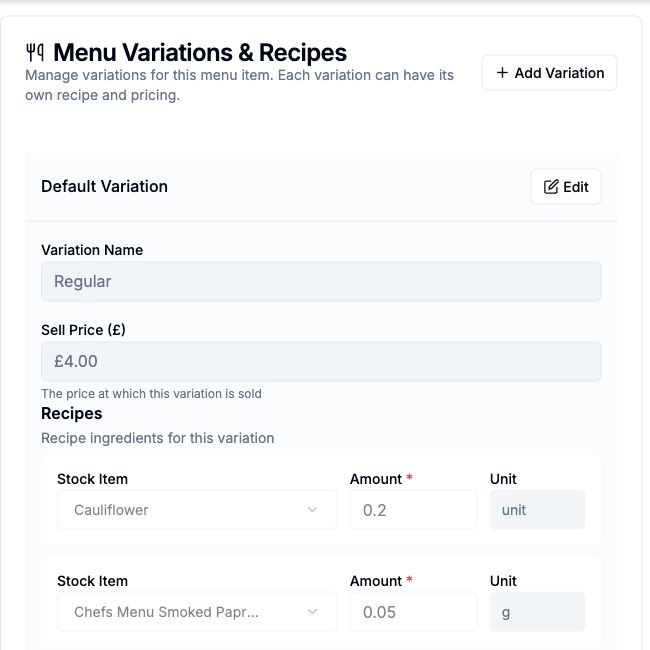
Recipes belong to an item variation. Each variation can have its own ingredients, quantities and sell price, so different sizes can consume different amounts without duplicating the whole item.
Choose the Variation First
For example, a menu item can have regular and large variations with different milk quantities and prices. Edit the recipe for the specific variation you intend to sell or produce. The hybrid editor uses a simpler variation setup and does not offer Add Variation.
On the item detail page, recipe controls appear in Menu Variations & Recipes for menu and hybrid items, or Ingredients & Batch Production for stock-focused setup.
 View larger
Check Ingredient References and Amounts
Choose the ingredient items and enter the amounts required for the variation. Keep the ingredient units aligned with the inventory units and check the selected variation before saving.
Recipe setup provides the ingredient relationship. The location's inventory provides availability and stock costs, so a valid recipe alone does not guarantee that production or a sale has sufficient stock.
Selling and Production Use the Same Setup
Menu items can use recipe ingredients when sold. Stock items with configured ingredients can use Batch Production to turn ingredient stock into finished inventory.
Hybrid items also hold finished stock. Review their sales-order consumption breakdown when checking whether an order used finished goods directly or a stored ingredient path.
Edit a recipe on an item Review variation prices and versions Produce finished stock from ingredients